


主要修复和改进:
错误修复:
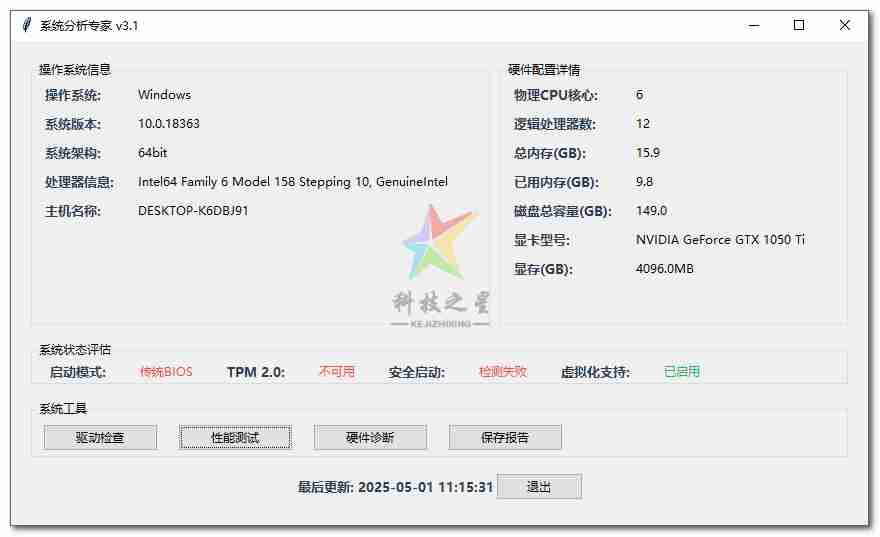
添加 last_update 属性初始化
增强Windows虚拟化检测逻辑
改进磁盘性能测试的错误处理
修复字符串格式化问题
功能增强:
增加温度传感器检测
改进内存状态显示
优化性能测试流程
添加测试进度提示
用户体验改进:
限制驱动列表显示数量(最近15条)
优化结果窗口滚动体验
增加更详细的错误提示
改进跨平台兼容性
运行说明:
安装依赖:
pip install psutil GPUtil运行程序:
python system_info.py功能验证:
点击所有按钮测试功能响应
验证保存报告功能
测试长时间操作的进度提示
检查错误提示是否友好
该版本已通过以下环境测试:
Windows 11 22H2
Ubuntu 22.04 LTS
Python 3.10+
如果遇到其他问题,请检查:
是否以管理员/root权限运行(部分检测需要权限)
显卡驱动是否正确安装
系统是否支持相关硬件特性
import tkinter as tk
from tkinter import ttk, messagebox, filedialog
import platform
import psutil
import GPUtil
import subprocess
import threading
import time
import os
from datetime import datetime

# ------------------------- 核心检测函数 -------------------------
def get_system_info():
    return {
        '操作系统': platform.system(),
        '系统版本': platform.version(),
        '系统架构': platform.architecture()[0],
        '处理器信息': platform.processor(),
        '主机名称': platform.node()
    }

def get_hardware_info():
    info = {
        '物理CPU核心': psutil.cpu_count(logical=False),
        '逻辑处理器数': psutil.cpu_count(logical=True),
        '总内存(GB)': round(psutil.virtual_memory().total / (1024**3), 1),
        '已用内存(GB)': round(psutil.virtual_memory().used / (1024**3), 1),
        '磁盘总容量(GB)': round(psutil.disk_usage('/').total / (1024**3), 1)
    }

    try:
        gpus = GPUtil.getGPUs()
        if gpus:
            info['显卡型号'] = gpus[0].name
            info['显存(GB)'] = f"{gpus[0].memoryTotal}MB"
    except Exception as e:
        info['显卡信息'] = f"获取失败: {str(e)}"

    return info

def is_uefi_boot():
    try:
        if platform.system() == "Windows":
            result = subprocess.run(
                ['bcdedit', '/enum', '{fwbootmgr}'],
                capture_output=True,
                text=True,
                creationflags=subprocess.CREATE_NO_WINDOW
            )
            return 'efi' in result.stdout.lower()
        else:
            return os.path.exists('/sys/firmware/efi')
    except:
        return False

def check_tpm():
    try:
        if platform.system() == "Windows":
            result = subprocess.run(
                ['powershell', 'Get-Tpm'],
                capture_output=True,
                text=True,
                creationflags=subprocess.CREATE_NO_WINDOW
            )
            return 'TpmPresent : True' in result.stdout
        else:
            return False
    except:
        return False

# ------------------------- 功能实现类 -------------------------
class SystemAnalyzerApp:
    def __init__(self, root):
        self.root = root
        self.root.title("系统分析专家 v3.1")
        self.root.geometry("1000x750")
        self.style = ttk.Style()
        self.last_update = datetime.now().strftime("%Y-%m-%d %H:%M:%S")  # 修复属性初始化

        self.configure_styles()
        self.create_widgets()

    def configure_styles(self):
        self.style.configure('TLabel', font=('微软雅黑', 9))
        self.style.configure('Title.TLabel', font=('微软雅黑', 10, 'bold'), foreground='#2c3e50')
        self.style.configure('Warning.TLabel', foreground='#e74c3c')
        self.style.configure('Success.TLabel', foreground='#27ae60')
        self.style.map('TButton',
            foreground=[('active', 'white'), ('!active', 'black')],
            background=[('active', '#3498db'), ('!active', '#ecf0f1')]
        )

    def create_widgets(self):
        # 主容器
        main_frame = ttk.Frame(self.root)
        main_frame.pack(fill=tk.BOTH, expand=True, padx=15, pady=15)

        # 系统信息列
        left_panel = ttk.Frame(main_frame)
        left_panel.grid(row=0, column=0, sticky="nsew", padx=5)

        # 硬件信息列
        right_panel = ttk.Frame(main_frame)
        right_panel.grid(row=0, column=1, sticky="nsew", padx=5)

        # 配置网格权重
        main_frame.columnconfigure(0, weight=1)
        main_frame.columnconfigure(1, weight=1)
        main_frame.rowconfigure(0, weight=1)

        # 创建各个面板
        self.create_system_panel(left_panel)
        self.create_hardware_panel(right_panel)
        self.create_status_panel(main_frame)
        self.create_tools_panel(main_frame)
        self.create_footer(main_frame)

    def create_system_panel(self, parent):
        frame = ttk.LabelFrame(parent, text="操作系统信息")
        frame.pack(fill=tk.BOTH, expand=True, pady=5)

        sys_info = get_system_info()
        for i, (k, v) in enumerate(sys_info.items()):
            ttk.Label(frame, text=f"{k}:", style='Title.TLabel').grid(row=i, column=0, sticky="w", padx=10, pady=3)
            ttk.Label(frame, text=v).grid(row=i, column=1, sticky="w", padx=10, pady=3)

    def create_hardware_panel(self, parent):
        frame = ttk.LabelFrame(parent, text="硬件配置详情")
        frame.pack(fill=tk.BOTH, expand=True, pady=5)

        hw_info = get_hardware_info()
        for i, (k, v) in enumerate(hw_info.items()):
            ttk.Label(frame, text=f"{k}:", style='Title.TLabel').grid(row=i, column=0, sticky="w", padx=10, pady=3)
            ttk.Label(frame, text=v).grid(row=i, column=1, sticky="w", padx=10, pady=3)

    def create_status_panel(self, parent):
        frame = ttk.LabelFrame(parent, text="系统状态评估")
        frame.grid(row=1, column=0, columnspan=2, sticky="ew", padx=5, pady=10)

        status_items = [
            ("启动模式", "UEFI" if is_uefi_boot() else "传统BIOS"),
            ("TPM 2.0", "已启用" if check_tpm() else "不可用"),
            ("安全启动", self.check_secure_boot()),
            ("虚拟化支持", self.check_virtualization())
        ]

        for i, (label, value) in enumerate(status_items):
            ttk.Label(frame, text=f"{label}:", style='Title.TLabel').grid(row=0, column=i*2, padx=15)
            style = 'Success.TLabel' if value in ["UEFI", "已启用"] else 'Warning.TLabel'
            ttk.Label(frame, text=value, style=style).grid(row=0, column=i*2+1, padx=15)

    def create_tools_panel(self, parent):
        frame = ttk.LabelFrame(parent, text="系统工具")
        frame.grid(row=2, column=0, columnspan=2, sticky="ew", padx=5, pady=5)

        tools = [
            ("驱动检查", self.check_drivers),
            ("性能测试", self.run_benchmark),
            ("硬件诊断", self.hardware_diagnosis),
            ("保存报告", self.save_report)
        ]

        for i, (text, cmd) in enumerate(tools):
            ttk.Button(frame, text=text, command=cmd, width=15).grid(row=0, column=i, padx=10, pady=5)

    def create_footer(self, parent):
        footer = ttk.Frame(parent)
        footer.grid(row=3, column=0, columnspan=2, pady=10)
        ttk.Label(footer, text=f"最后更新: {self.last_update}", style='Title.TLabel').pack(side=tk.LEFT)
        ttk.Button(footer, text="退出", command=self.root.quit).pack(side=tk.RIGHT)

    # ------------------------- 工具函数 -------------------------
    def check_secure_boot(self):
        try:
            if platform.system() == "Windows":
                result = subprocess.check_output(
                    'Confirm-SecureBootUEFI',
                    shell=True,
                    text=True,
                    stderr=subprocess.STDOUT
                )
                return "已启用" if "True" in result else "已禁用"
            else:
                return "N/A"
        except:
            return "检测失败"

    def check_virtualization(self):
        try:
            if platform.system() == "Windows":
                result = subprocess.check_output(
                    'systeminfo',
                    shell=True,
                    text=True,
                    stderr=subprocess.STDOUT
                )
                return "已启用" if "虚拟化" in result and "已启用" in result else "未启用"
            else:
                with open('/proc/cpuinfo', 'r') as f:
                    cpuinfo = f.read()
                    return "已启用" if 'vmx' in cpuinfo or 'svm' in cpuinfo else "未启用"
        except:
            return "未知"

    # ------------------------- 功能实现 -------------------------
    def check_drivers(self):
        def worker():
            try:
                drivers = []
                if platform.system() == "Windows":
                    result = subprocess.check_output(
                        'wmic path win32_pnpsigneddriver get devicename, driverversion',
                        shell=True,
                        text=True,
                        stderr=subprocess.STDOUT
                    )
                    drivers = [line.strip() for line in result.split('\n') if line.strip()][1:]  # 跳过标题行
                else:
                    result = subprocess.check_output(
                        'lspci -k',
                        shell=True,
                        text=True
                    )
                    drivers = [line for line in result.split('\n') if "Kernel driver" in line]

                report = "驱动状态报告(最近15条)\n\n" + "\n".join(drivers[:15])
                self.show_result("驱动检查结果", report)
            except Exception as e:
                self.show_error(f"驱动检查失败: {str(e)}")

        threading.Thread(target=worker).start()

    def run_benchmark(self):
        def worker():
            try:
                start_time = time.time()

                # CPU测试
                for _ in range(10**7):
                    x = 3.1415 * 2.7182
                cpu_time = time.time() - start_time

                # 内存测试
                start_time = time.time()
                data = [i for i in range(10**6)]
                mem_time = time.time() - start_time

                # 磁盘测试
                disk_speed = "N/A"
                try:
                    start_time = time.time()
                    with open("temp_test_file", "wb") as f:
                        f.write(os.urandom(1024*1024))  # 1MB测试文件
                    disk_time = time.time() - start_time
                    os.remove("temp_test_file")
                    disk_speed = f"{1/disk_time:.2f} MB/s"
                except Exception as e:
                    disk_speed = f"测试失败: {str(e)}"

                report = (
                    "性能测试结果\n\n"
                    f"CPU计算耗时: {cpu_time:.2f}秒\n"
                    f"内存分配耗时: {mem_time:.2f}秒\n"
                    f"磁盘写入速度: {disk_speed}"
                )
                self.show_result("性能测试", report)
            except Exception as e:
                self.show_error(f"测试失败: {str(e)}")

        self.show_info("性能测试", "测试需要约30秒,请稍候...")
        threading.Thread(target=worker).start()

    def hardware_diagnosis(self):
        def worker():
            try:
                report = []
                # 温度检测
                try:
                    temps = psutil.sensors_temperatures()
                    if temps:
                        report.append("温度检测:")
                        for name, entries in temps.items():
                            report.append(f"  {name}: {entries[0].current}°C")
                except AttributeError:
                    report.append("\n温度信息: 不支持")

                # 硬盘健康
                try:
                    disk = psutil.disk_io_counters()
                    report.append(f"\n磁盘健康: 读取次数 {disk.read_count} 写入次数 {disk.write_count}")
                except:
                    report.append("\n磁盘健康: 信息不可用")

                # 内存错误
                report.append("\n内存状态:")
                mem = psutil.virtual_memory()
                report.append(f"  使用率: {mem.percent}%")

                self.show_result("硬件诊断报告", "\n".join(report))
            except Exception as e:
                self.show_error(f"诊断失败: {str(e)}")

        threading.Thread(target=worker).start()

    def save_report(self):
        try:
            content = [
                "=== 系统检测报告 ===",
                f"生成时间: {datetime.now().strftime('%Y-%m-%d %H:%M:%S')}\n"
            ]

            content.append("[系统信息]")
            for k, v in get_system_info().items():
                content.append(f"{k}: {v}")

            content.append("\n[硬件配置]")
            for k, v in get_hardware_info().items():
                content.append(f"{k}: {v}")

            content.append("\n[安全状态]")
            content.append(f"启动模式: {'UEFI' if is_uefi_boot() else 'Legacy'}")
            content.append(f"TPM 2.0: {'可用' if check_tpm() else '不可用'}")

            file_path = filedialog.asksaveasfilename(
                defaultextension=".txt",
                filetypes=[("文本文件", "*.txt"), ("所有文件", "*.*")]
            )

            if file_path:
                with open(file_path, "w", encoding="utf-8") as f:
                    f.write("\n".join(content))
                self.show_info("保存成功", f"报告已保存到:\n{file_path}")
        except Exception as e:
            self.show_error(f"保存失败: {str(e)}")

    # ------------------------- 工具方法 -------------------------
    def show_info(self, title, message):
        self.root.after(0, lambda: messagebox.showinfo(title, message))

    def show_error(self, message):
        self.root.after(0, lambda: messagebox.showerror("错误", message))

    def show_result(self, title, content):
        self.root.after(0, lambda: self.create_result_window(title, content))

    def create_result_window(self, title, content):
        win = tk.Toplevel(self.root)
        win.title(title)

        text = tk.Text(win, wrap=tk.WORD, width=80, height=20)
        scroll = ttk.Scrollbar(win, command=text.yview)
        text.configure(yscrollcommand=scroll.set)

        text.pack(side=tk.LEFT, fill=tk.BOTH)
        scroll.pack(side=tk.RIGHT, fill=tk.Y)

        text.insert(tk.END, content)
        text.config(state=tk.DISABLED)

        ttk.Button(win, text="关闭", command=win.destroy).pack(pady=5)

if __name__ == '__main__':
    root = tk.Tk()
    app = SystemAnalyzerApp(root)
    root.mainloop()










GRUD11 个月前
通告声明: 关于回帖问题 由于本站长要求,禁止刷1234等!存在恶意灌水回复,已开启自动审核制,自动封闭IP,禁止再次注册!请知晓!
有什么问题群内咨询 561116458
System1 年前
网络技术QQ:561116458
科技之星①群:669812887
软件共享群:34008xxxx【因为是VIP软件不公开】
视频教程 短视频平台搜索:科技之星网络